DAVID Documentation: Gene Search
Gene Search provides quick mapping and access to gene-specific annotations for a gene/protein identifier without requiring list upload.
-
Help and Switch to Classic VersionLink to this help page and provides access to the legacy Gene List Report interface.
-
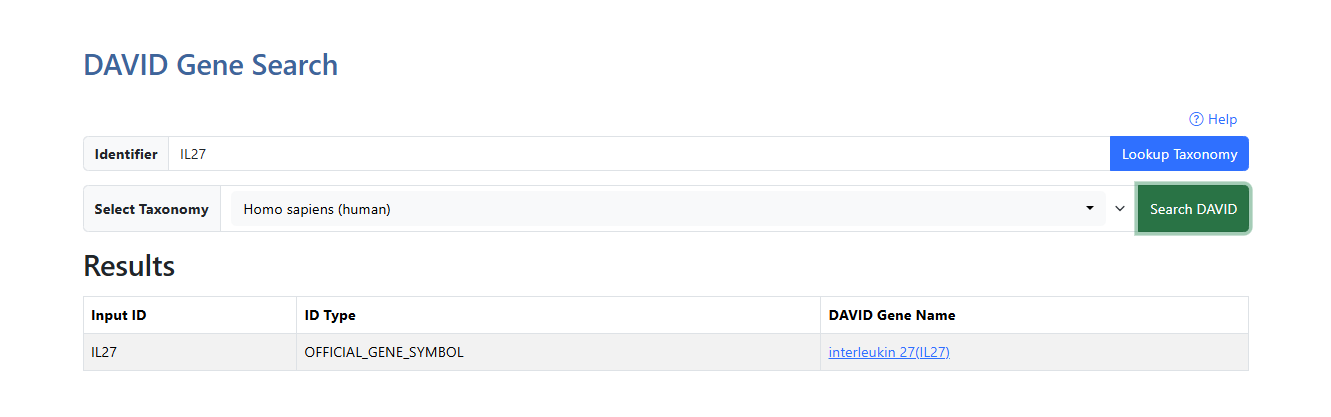
Identifier search boxType full identifier (case insensitive) and click on the blue Lookup Taxonomy button. If any results are found, the taxonomy selection box will appear. If no results are found, a red diaglogue box will appear indicating "No taxonomies found for the identifier. Please try a different identifier."
-
Select TaxonomyOnce a valid identifier is entered, all available species with the identifier are populated in the Select Taxonomy drop down menu. The list of species is displayed alphabetically and can be searched by typing in the search bar within the dropdown (case insensitive). Click on a species name to select it, then click the green Search DAVID button to continue.
-
Input IDUser entered identifier.
-
ID TypeThe identifier type matching the input identifier and selected taxonomy.
-
DAVID Gene NameFull name of gene available from DAVID. Click the gene name link to explore the full gene report. For more information, see the Gene Report documentation page.